Inspectra BIM 0.3.0 — Your Free Viewer Now Speaks BCF
Version 0.3.0 of Inspectra BIM Free is out, and it brings the single most requested capability for working in real project teams: openBIM issue exchange. Inspectra now reads BCF — the buildingSMART BIM Collaboration Format — so coordination issues raised in Solibri, Navisworks, BIMcollab or any other BCF-capable tool open right inside your free viewer. Here’s everything that changed since 0.2.0.
BCF Import — coordination issues from any tool
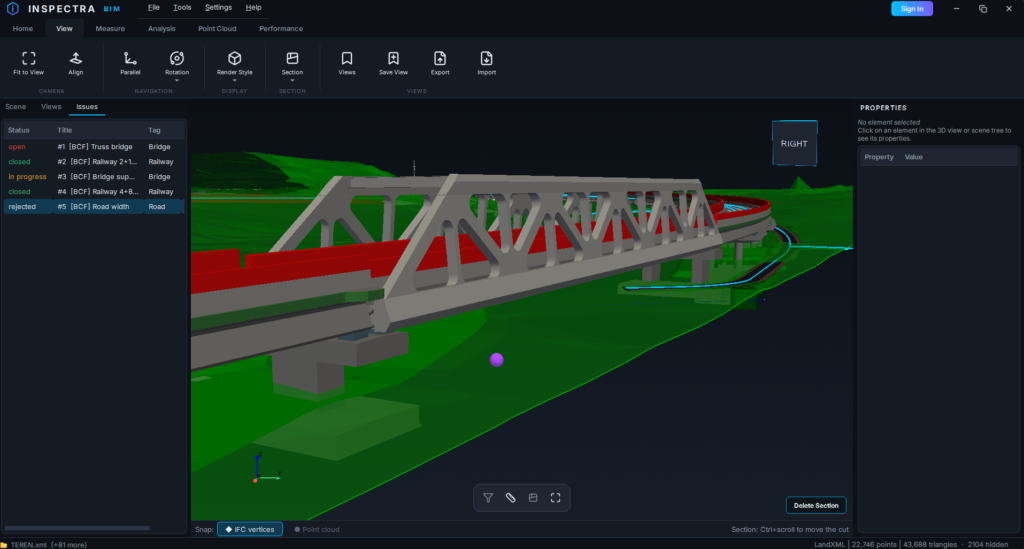
BCF is the industry-standard container for model-based issues: each topic carries a title, status, author, description, a camera viewpoint and the full discussion thread. Inspectra 0.3.0 implements BCF 2.1 according to the official buildingSMART specification and imports both .bcf and .bcfzip files.
Go to Home → Import BCF, pick a file, and every topic lands in Inspectra as an issue:
- Viewpoints are preserved — one click on an imported issue flies the camera to exactly where the problem was flagged, including orthogonal views and element visibility (hidden elements stay hidden).
- The whole conversation comes along — every comment with its author and date, so you see the full history of the discussion, not just the headline.
- Statuses map cleanly — open, in progress, rejected, closed; files from other vendors with their own status vocabulary (Active, Resolved, ReOpened…) are translated sensibly.
- Imported issues are clearly marked with a
[BCF]prefix, and re-importing the same file never creates duplicates — topics are matched by their GUID.
New Issues panel
The left dock now has three tabs: Scene · Views · Issues. The Issues panel lists every issue in the scene — imported from BCF or received inside an .ins scene file from an Inspectra Audit user. You can jump to each issue’s viewpoint, open the full details, reply in the comment thread and update the status as you resolve things. Creating and exporting issues remains part of the upcoming Inspectra Audit module — but reviewing and responding is free, because coordination only works when the whole team can take part.
Open button, upgraded
The Open tile on the Home tab is now a split button: click the face and you get the usual file dialog, click the arrow underneath and you get your five most recently opened files — IFC models and .ins scenes alike. One click to get back into yesterday’s federated model.
Sections and coloring, refined
- Delete Section — an active section now shows its own button directly on the model (next to Delete Measurements / Restore Model Color), so removing it is deliberate. Esc no longer clears sections by accident.
- Pick with confidence — when placing a Surface or Box section, the element under your cursor highlights in purple before you click, so you always know which face you’re about to cut through.
- Analysis results as views — Attributes Audit and Duplicates Check now automatically save their coloring as a timestamped view. Restore the original model colors, work on, and bring the audit overlay back at any time with one click — without moving your camera, because these views store colors only.
- Duplicates stand out — during a Duplicates Check everything except the suspected duplicates fades to 10% opacity, so overlapping geometry is impossible to miss.
Under the hood
Application settings (recent files, dialog setups, preferences) moved from the Windows registry to a plain settings file. This fixes a rare but frustrating case where settings silently failed to persist between sessions — and makes them portable and easy to back up. Existing settings migrate automatically on first launch. Scene loading also got smarter about the recent-files list, and the status bar now tells you exactly when a color view references models that aren’t loaded.
Get it
Download Inspectra BIM 0.3.0 Free from the website — the installer upgrades any previous version in place. If you’re on 0.2.0, the app will let you know an update is available.
Inspectra BIM — a fast, native Windows viewer for IFC and point clouds.
Try it on your own model
Inspectra BIM Free opens IFC, E57/LAS and XML locally — no plugins, no cloud.