Inspectra BIM 0.3.1 — Audit Reports in HTML with more info
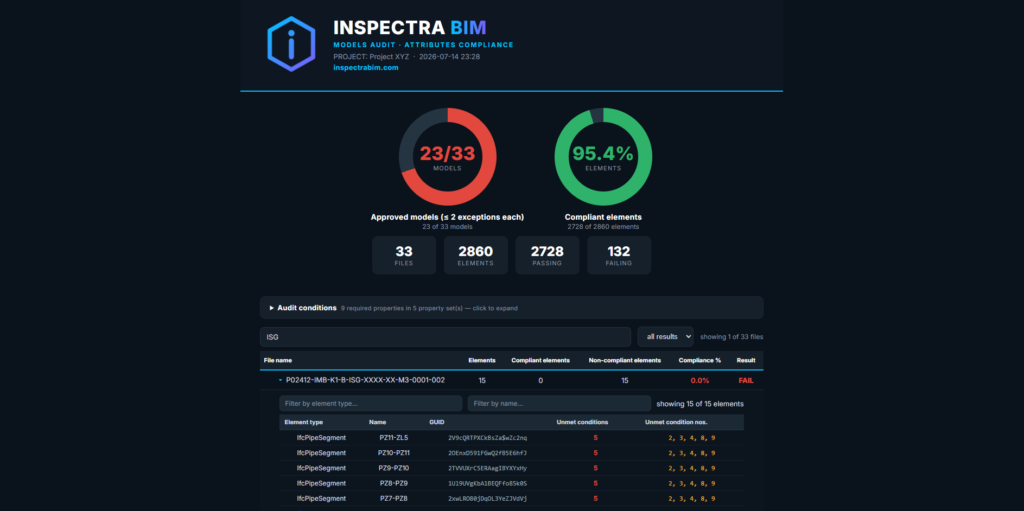
A focused update to Inspectra BIM Free. Version 0.3.1 sharpens the Attributes Audit HTML report — the document you actually hand to a modeler and say “fix this.” Three changes, all aimed at the same goal: when an element fails the audit, the report should tell you exactly why, and finding the right element should take seconds, not minutes for guessing.
Numbered conditions — failures you can point at
The collapsible Audit conditions panel at the top of the report now numbers every checked property, straight through all property sets: 1, 2, 3… And each element in the per-file drill-down gained a matching column — Unmet condition nos. — listing exactly which numbered conditions that element failed.
Before, the report told you a wall was missing “2 of 4” required properties, and the modeler had to work out which two. Now the row says 2, 4, the conditions panel says what 2 and 4 are, and the fix is unambiguous. It also makes conversations shorter: “condition 3 is failing across the whole MEP model” is a complete bug report.
Filter inside each file
Large models produce long element lists. Each file’s drill-down now has its own pair of filter boxes — Element type and Name — matching any part of the text, case-insensitively, and combining with each other. Type wall in one and ext in the other and you’re looking at exactly the external walls, with a live “showing 12 of 340 elements” counter. Every file filters independently, and the existing file-level search at the top of the report still works exactly as before.
Zero in green
Small thing, but it bothered us too: compliant elements used to show their unmet-conditions count — 0 — in red, the same color as failures. A zero is good news. It’s green now.
Get it
Inspectra BIM 0.3.1 Free is available on the website — the installer upgrades any previous version in place, and the app will offer you the update if you’re on 0.3.0. Reports generated with 0.3.1 are, as always, single self-contained HTML files — filters, condition numbers and all — so they work wherever you send them.
Inspectra BIM — a fast, native Windows viewer for IFC and point clouds.
Try it on your own model
Inspectra BIM Free opens IFC, E57/LAS and XML locally — no plugins, no cloud.