Inspectra BIM 0.9.0 — a command palette, surgical drawings, and DXF that knows where it stands
Version 0.9.0 is the release where Inspectra starts feeling like a power tool. A command palette that speaks BIM, keyboard shortcuts you define yourself, drawings you can clean up edge by edge, and DXF exports that land at true model coordinates — most of it born directly from the first weeks of Edit-module feedback.
Talk to the scene: the command palette
Press Ctrl+K anywhere and one box appears that understands two languages. Type a fragment of any command name — fit, sect 2, class col — and fuzzy search surfaces it; Enter runs it. Only commands that are actually runnable right now show up.
The second language is ours, and it thinks in BIM, not in CAD command aliases:
hide class:IfcProxy— hide every proxy in the federationisolate file:Arch class:IfcWall— criteria combineselect filter:"MEP risers"— your saved Filter sets are part of the languagecolor class:IfcWall #d04040— or justredshow— everything back
As you type, the palette answers with a live count — Hide 234 element(s) — before you commit. No syntax to memorise: verbs and key:value, that’s all.
Keyboard shortcuts, finally yours
Performance → Aliases lists every command in Inspectra. Double-click, press the keys, done — conflicts light up red. Whole sets save as profiles: export one to a file, carry it to the office machine, import, delete the ones you outgrew. The active profile loads on every start.
Drawings get surgical
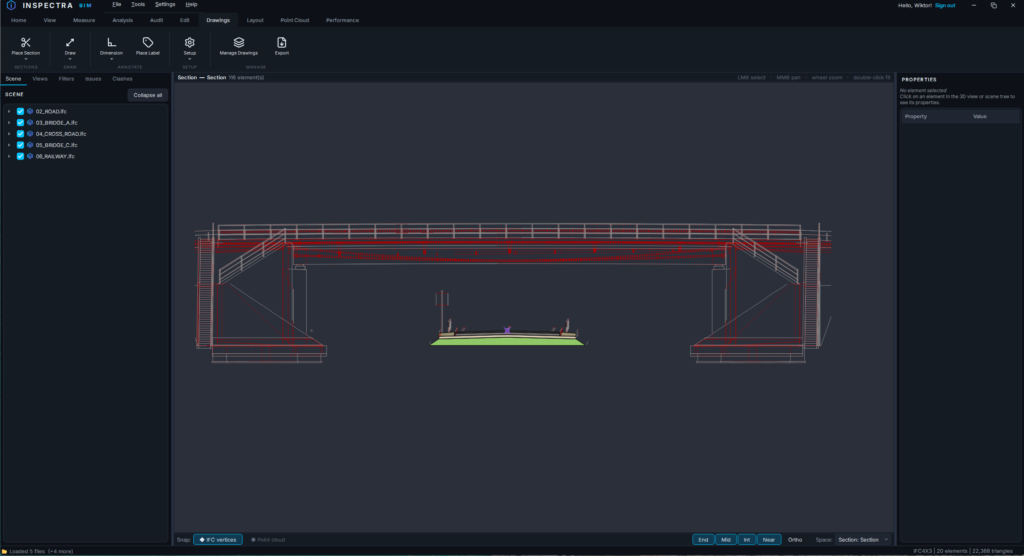
The Edit module’s drawing space picked up the tools that daily documentation work actually asks for:
- Hide a single edge. Right-click any line on a drawing — not the whole element, that one edge — and it is gone. Hover the element and the hidden edge ghosts back so you can find it; Show edge or Show hidden edges restores. Masks survive saving, follow onto layouts and leave the DXF export too.
- The camera stays put. Hiding, undo, redraws — the view no longer jumps back to a fresh fit mid-work.
- DXF references (XREF). Attach external DXF files to a drawing — at their own global coordinates or by picking an insertion point — with a manager to show, hide or detach each. References are live: save the file in its CAD and Inspectra picks it up.
- Section Sets. A new drawing type that is neither a section nor a paper layout: a model-space board, one unit = one metre, where you drag several sections and arrange them freely. Export produces one DXF with the whole arrangement.
DXF that knows where it stands
Exports gained a Global coordinates option. Top views land at their true easting/northing — open the file over your survey base and it simply fits. Straight sections lay themselves flat along their cut line in plan, preserving direction and length. And a Section Set anchors the whole composition by its Top View member, so one file carries the plan and the sections, georeferenced.
The point-cloud raster underlay joined the export as well: the DXF now ships with a side-car image, referenced and placed so CAD shows the scan behind your line work. A new Quality dial (Draft → Ultra) controls its sharpness, and detaching a drawing freezes its raster permanently — even after the source scan is unloaded.
Snapping, straightened out
Three fixes from the field:
- Intersections actually win now. The X snap existed, but a vertex at the edge of its tolerance could steal a crossing sitting right under your cursor. Candidates now compete by weighted distance — the crossing under the cursor gets the X.
- Alignments are snappable. On profiles and longitudinal sections the axis and design-grade polylines join the snap engine — the crossing of a niweleta with terrain is one click.
- Markers only when they matter. Snap glyphs appear while a tool that consumes coordinates is armed — plain hovering stays clean.
Quality of life
A global section (X/Y/Z) now starts at your pivot point, with its drag ball right there instead of at the scene origin. Scroll-zoom over empty space is as smooth as zooming at geometry. Longitudinal sections can take the whole alignment with one tick, and they no longer draw a stray straight line across the 3D model.
Get it
Download Inspectra BIM 0.9.0 from inspectrabim.com/download. The palette, aliases and snapping improvements are part of the free viewer; the drawing tools belong to the Edit module. Upgrading over an existing installation keeps your settings and licence; installed copies will offer the update on their next start.
Try it on your own model
Inspectra BIM Free opens IFC, E57/LAS and XML locally — no plugins, no cloud.