Inspectra BIM 0.8.0 — photogrammetry meshes in full colour, point clouds that behave, and the Edit premiere
Version 0.8.0 is the reality-capture release. If your projects involve drone surveys, laser scans or any mix of point clouds and BIM models, almost everything here is for you: Inspectra learns to open textured photogrammetry meshes, point-cloud scenes get dramatically lighter, snapping on clouds becomes something you can trust your measurements to, and a new section mode cuts through a scan with two clicks. And quietly, at the end: the paid Inspectra Edit module ships in the installer for the first time.
Textured meshes join the scene
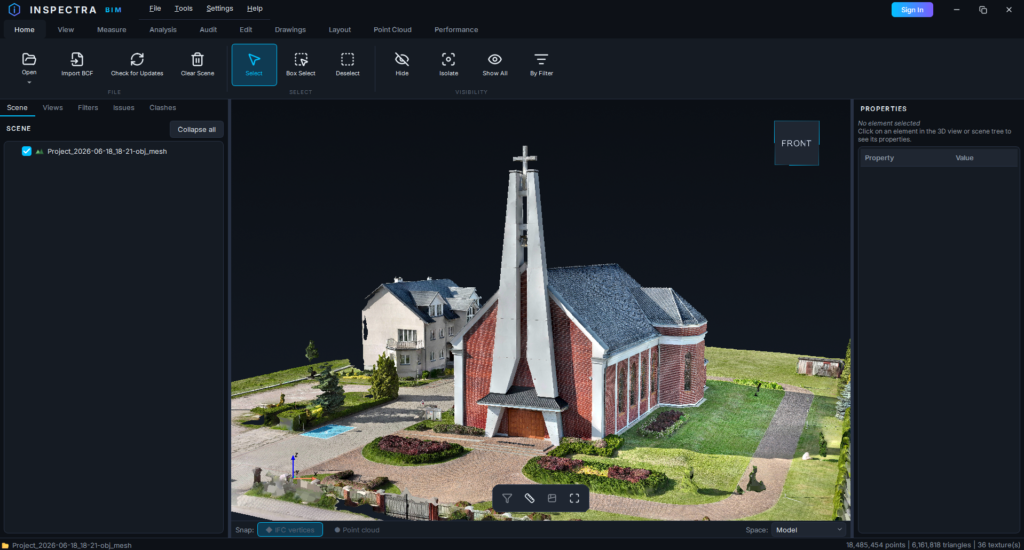
Photogrammetry deliverables — the coloured, textured surface models that drone mapping software produces — now open directly in Inspectra:
- OBJ with its
.mtlmaterial file and texture atlases. A model built from dozens of texture images renders exactly as it does in the software that made it. - PLY in both common flavours: a texture image per file, or colours baked into the vertices. Tiled exports —
tile_1.ply,tile_2.ply, and thirty more — load in one go and appear as a single item in the scene tree, not thirty rows of clutter.
Georeferencing is handled for you. The offset.xyz file that PIX4D-style exports carry is picked up automatically — Inspectra even finds it in the sibling export folder when the PLY export ships without its own — so the mesh lands at its true coordinates and lines up with the point cloud and the IFC models already in the scene.
These are first-class citizens, not a preview: you can snap to a mesh, measure on it, and cut sections through it like through anything else. And they are quick — a 36-tile PLY export with over six million triangles opens in about a second; a 793 MB OBJ with 36 texture atlases takes under ten.
Paint the model by IFC class
The View tab gains Class Colors: pick an IFC class, pick a colour, and every element of that class across every loaded model repaints instantly. The classic use case is the proxy hunt — turn all IfcBuildingElementProxy red and see at a glance what the modeller never classified — but it works just as well for teaching a mixed federation to read by discipline. The dialog lists every class with its element count, filters as you type, and resets per class or all at once. The colouring saves into the .ins scene, so the scheme travels with the file.
Point-cloud snapping you can trust
Measuring on point clouds got a reliability pass, aimed at three small betrayals you may know from practice:
- If the snap ball shows, the click lands. The hover preview and the actual click used to make up their minds separately — you could see the ball on a cloud point, click, and have nothing happen because a hidden model vertex won the pick. They now agree by construction: whatever the ball marks is what the click places.
- Deep zoom no longer swallows the snap. Zoomed far into a scan, the gaps between rendered points grow larger than the points themselves and the cursor mostly hovers over empty background. Inspectra now probes a small ring around the cursor and catches the point sitting just beside it — the ball stays with you instead of flickering out.
- Sections are respected. With a section active, the snap used to happily grab points the plane had cut away, leaving a measurement ball floating in front of the cut. Clipped points are now excluded outright.
A section through two points
The Section menu gains By 2 Points: click two points and a vertical cutting plane rises along the line between them — the natural way to cut a corridor, a facade line, or a scanned interior. The picks fall back gracefully: they catch the IFC model first, then the point cloud, then empty space, so the tool works even in a scene that contains nothing but a scan. After the first click a guide line follows the cursor, so you see exactly where the cut will run before you commit; the usual Flip button and Ctrl+scroll stepping apply.
Scenes that open instantly
Heavy reality-capture scenes stop taxing you up front:
- Point clouds and meshes in
.insscenes now load on demand. Opening a scene shows them as grey placeholder rows in the tree — the scene itself appears immediately. Tick a checkbox and the cloud loads right then, with the decimation settings it was saved with. A ten-gigabyte scan no longer stands between you and a quick look at the model. - Scenes with only a cloud or a mesh save now too. No IFC required — and when you reopen such a scene, Inspectra offers to load all the attached files in one go.
- No more phantom save prompts. If nothing changed since the scene was opened or last saved, closing Inspectra just closes it. The “do you want to save?” question only appears when there is actually something to save.
Alignment ergonomics
The alignment features from 0.7.0 picked up the polish that daily use asks for: clicking an axis now shows in Properties which file it came from; right-clicking an axis directly in the 3D scene offers its chainage labels and a quick Hide this axis; the hide and isolate shortcuts work on a highlighted axis like on any element; and terrain surfaces (TIN) can take a separate colour per file, so overlapping ground models stay tellable apart.
Fixes worth a line
- Section planes now cut textured meshes in every case — meshes loaded after a section was enabled used to escape it.
- A LandXML file detached from a scene stays detached — it no longer sneaks back in on the next save.
- Assorted rendering-console noise trimmed, so the log stays readable when something real happens.
The Edit premiere
With 0.8.0, the installer carries the paid Inspectra Edit module for the first time — editing IFC data and producing 2D documentation straight from the scene. The Edit, Drawings and Layout tabs are in the ribbon now; a licence with the Edit entitlement unlocks them. We are deliberately keeping the tour short here: Edit gets its own series of posts in the coming weeks, one workflow at a time, the way it deserves.
To be notified as those land — and when the Edit store opens — create a free account at inspectrabim.com/account and enable product updates in your dashboard.
Get it
Download Inspectra BIM 0.8.0 from inspectrabim.com/download — the free viewer needs no account, and the meshes, the snapping and the new section mode are all part of it. Upgrading over an existing installation keeps your settings and licence; installed copies will also offer the update on their next start.
Try it on your own model
Inspectra BIM Free opens IFC, E57/LAS and XML locally — no plugins, no cloud.