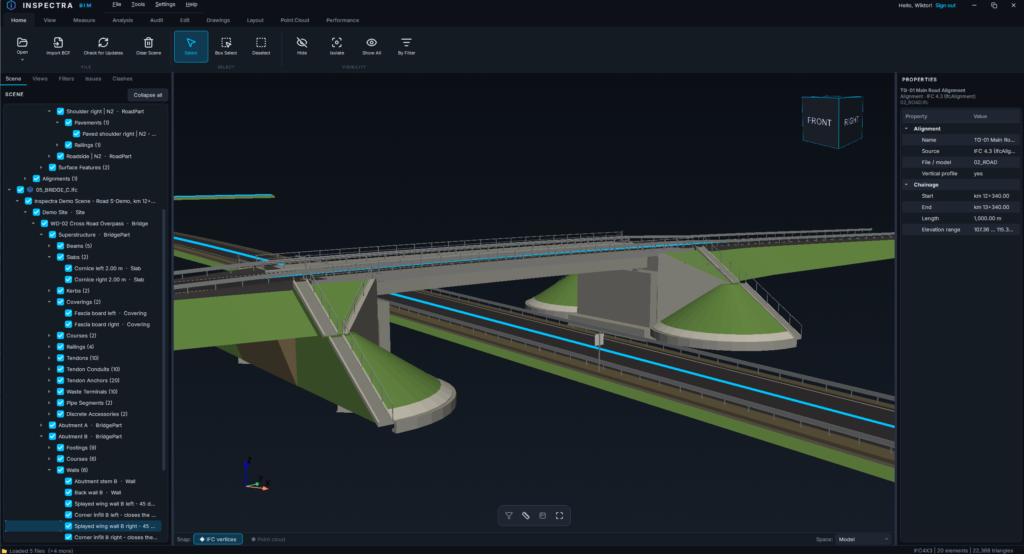
Inspectra BIM 0.9.1 — colours come back, sections come to hand, and axis-only IFC files open
A focused follow-up to 0.9.0, driven entirely by what surfaced in the first days of real use: one colour bug worth its own release, a section handle that now behaves like a tool instead of a marble, and IFC 4.3 files that carry nothing but alignments.
Material colours are back
A model whose colours live on its materials — the way most IFC4 and IFC4.3 exports are written — rendered flat grey. Models that colour each solid individually (typical IFC2x3 from CAD) were unaffected, which is exactly why this hid for a while.
The cause was on our side: the geometry library changed the shape of its style object, dropping the flag we tested and returning colour channels in a form that could no longer be read the old way. Inspectra now inspects what the style actually offers instead of assuming a version, so both the old and the new layout work. A road model that used to open in a single grey now opens in its nine real colours.
One-time note: because the cached geometry stored those grey colours, the first open of an already-known model after updating rebuilds its cache. It takes a moment, once per model, and then everything is as fast as before.
The section handle became a tool
The violet ball that moves a cut got three changes, all from watching it in use:
- It comes to you. Place a cut, fly somewhere else in the model, and the handle used to be left behind — you had to go hunting for it. It now slides along its own plane to your pivot point whenever it leaves the screen. The cut itself never moves: a plane is infinite, so sliding the grip sideways keeps exactly the same section.
- It says what it does. Instead of a plain sphere it is now an arrow glyph aimed along the direction the cut travels — the standard “drag me this way” of any CAD. It is bigger than before, and the six face handles of a section box carry the same arrow, each pointing along its own face.
- It gets out of the way. After four still seconds — you framing a screenshot — the handle shrinks to a discreet marker. Move the camera, scroll or grab it and it is back at full size instantly. Its grab radius never shrinks, so a small handle is exactly as easy to catch as a big one.
Sections straight from the right click
Right-click any surface in the 3D view and the menu now offers Section Through This Face and Section Box From This Face. Same cut the Surface and Box tools produce — minus arming the tool and the second click. The entries only appear when the click actually landed on a face, and they work while a section already exists, moving it to the new face.
IFC 4.3 files with nothing but alignments
A file carrying only alignment axes — a corridor axis delivery with no solids — refused to open with “No geometry could be extracted”. The axes were being read correctly the whole time; only the check that follows them insisted on solids. Such files now open, draw their axes, and take part in everything downstream.
Their chainage is now read from the file, too. IFC 4.3 stores stationing next to the axis, and Inspectra had been ignoring it: an alignment starting at 12+340 reported 0+000. Chainage labels, Measure Alignment and Section from Alignment now read the real kilometres — the same behaviour LandXML axes have always had.
Get it
Download Inspectra BIM 0.9.1 from inspectrabim.com/download. Everything above is in the free viewer. Upgrading over an existing installation keeps your settings and licence; installed copies will offer the update on their next start.
Try it on your own model
Inspectra BIM Free opens IFC, E57/LAS and XML locally — no plugins, no cloud.