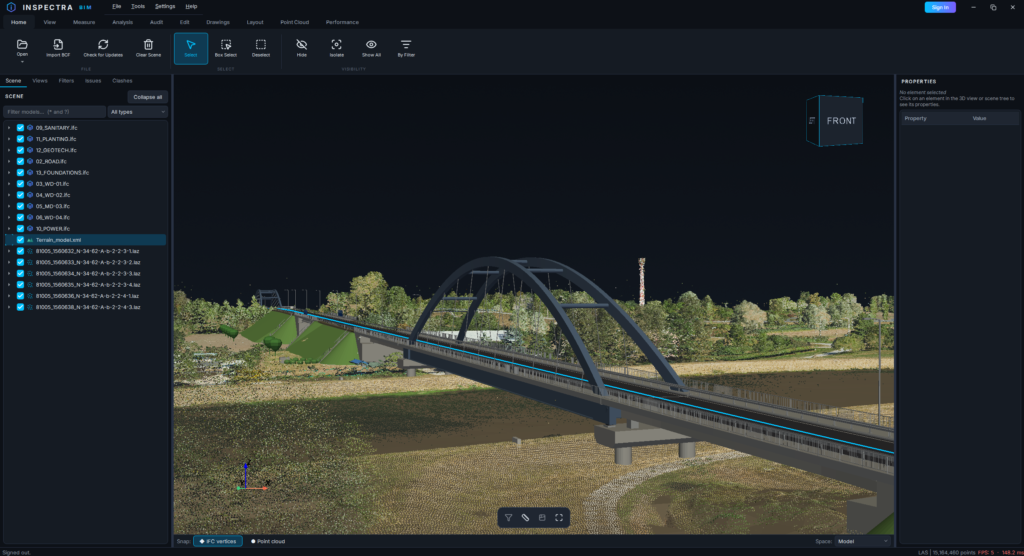
Inspectra BIM 0.9.2 — navigation that keeps its flow, geometry that stays whole, and a scene tree that scales
A quality release shaped by heavy, real-world scenes: chained camera moves no longer pay a toll between them, a silent multi-threading bug that could drop parts of an element’s geometry is fixed, batch point-cloud imports take one decision instead of many, and the scene tree learned search and multi-select.
Navigation keeps its flow
While you orbit, pan or zoom, Inspectra quietly lightens the scene — point clouds thin out, tiny far-away elements drop, feature edges pause — and brings everything back when you stop. Two costs of that trade got removed:
- A grace window between moves. Full detail used to return the instant you released the button, so the way everyone actually approaches a target — scroll, grab, orbit, scroll again — paid a full restore and re-lighten on every hand-off. Detail now returns about 0.7 s after the last move ends, and a new move inside that window simply continues the same cycle. Clicking to select or measure restores the scene first, so picking always sees the full model.
- Scrolling over empty space, again. On big models, each wheel tick with the cursor over the background re-ran a full-scene probe to find what was under the cursor (nothing was). The verdict is now remembered for the whole scroll burst — move the cursor or pause and it probes afresh, exactly as before, minus the stutter.
Nothing about the navigation itself changed — same controls, same behaviour, fewer hitches.
Multi-threaded loading could silently drop solids
An element built from several solids in one body could come out incomplete: a hydrant modelled as eight extrusions and one revolve rendered as two stubs, while other viewers showed it whole — with the file fully standard-compliant. The cause sat deep in the geometry pipeline: with multi-threaded tessellation, the kernel’s fallback path for shapes its fast engine cannot build stops engaging, and the element returns with only a subset of its solids — reported as a success.
Inspectra now reads the conversion log after loading and re-runs exactly the flagged elements down the safe single-threaded path, swapping the result in only when it is more complete. The cost is negligible — under a second on a 575-element model with one flagged element — and models that quietly lost geometry now match the reference viewers triangle for triangle.
One-time note: cached geometry from earlier versions may hold the incomplete meshes, so the first open of an already-known model after updating rebuilds its cache. A moment, once per model, and everything is as fast as before.
Decimate a whole batch of clouds in one decision
Importing several LAS/LAZ clouds at once used to mean answering the decimation dialog for each one. The dialog now offers “Use this percentage for the remaining clouds in this batch” — tick it and the rest of the queue loads without asking. It carries the percentage, not a point count, so every cloud keeps that share of its own total. The choice lives only for that batch; the next import asks again.
The scene tree learned search and multi-select
Federations with dozens of files outgrew a plain list:
- A filter box above the tree. Plain text matches anywhere in the name, case-insensitively;
*and?wildcards work when you want precision (*.las,STR-??-*). A type dropdown narrows to IFC models, point clouds, meshes, terrain or alignment files — both conditions combine. - Filtering hides rows, not models. The 3D scene is untouched, and the visibility checkboxes keep working on the filtered view — filter to
*.ifc, untick, and you have switched off every IFC file in two clicks. - Ctrl/Shift multi-select of files and elements. The right-click menu now acts on the whole selection — Hide/Isolate/Show N elements — and selecting several files offers Detach N selected files in one go.
Get it
Download Inspectra BIM 0.9.2 from inspectrabim.com/download. Everything above is in the free viewer. Upgrading over an existing installation keeps your settings and licence; installed copies will offer the update on their next start.
Try it on your own model
Inspectra BIM Free opens IFC, E57/LAS and XML locally — no plugins, no cloud.