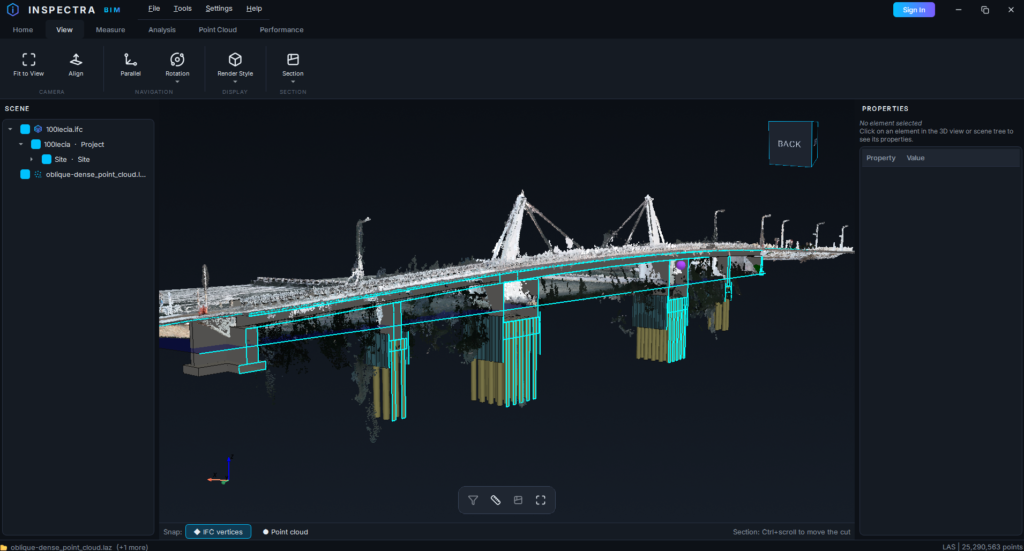
Inspectra BIM has landed — and it’s ready for you to test
Today Inspectra BIM goes out into the world. The first public build, v0.1.0, is live and free to download at inspectrabim.com. If you work with IFC models or point clouds, I’d genuinely love for you to put it through its paces.
What Inspectra BIM is
A fast, free desktop viewer for BIM. Open IFC models and point clouds, move through them in a smooth 3D view, and pull out the information you need — without firing up a heavyweight authoring suite, and without a licence wall for the basics.
The tagline says it plainly: inspect models without limits.
If you’ve used a lightweight viewer like BIMVision before, Inspectra will feel familiar — a tool light enough to hand to anyone on a project, whether or not they live in BIM software all day.
What you can do in this first build
- Open and explore IFC models in a responsive 3D viewport
- Load point clouds (LAS / LAZ) alongside your models
- Select elements — single click or box-select — and read their properties
- Measure what matters: distance, coordinates, area, and volume
- Slice into a model with a section box to see what’s inside
- Isolate, hide, and show elements to focus on exactly what you’re working on
It’s also built to stay smooth on real infrastructure coordinates — the kind that sit kilometres from the origin, where a lot of viewers start to flicker and fight you. Bridges, roads, rail: it should just work.
This is an early build — and that’s the point
v0.1.0 is a testing release. It’s stable enough for real work, but it’s early, and your feedback is what will shape where it goes next. There’s a “Report issue” button built right into the app, so if something looks off or a model won’t open the way you expect, tell me — every report genuinely helps.
I’d rather ship something real and improve it with you than polish in a vacuum for another year.
How to get it
- Download from inspectrabim.com
- Run InspectraBIM-Setup-0.1.0.exe — it installs per user, no admin rights needed
- Because this early build isn’t code-signed yet, Windows may show a SmartScreen notice. Click More info → Run anyway — code signing is on the way.
What’s next
Inspectra BIM is free, and viewing stays free. Premium modules are on the roadmap for people who need more — the first is Inspectra Audit, a deeper look at your model’s data and quality, arriving with version 1.0 later this year.
For now, though, everything you see in this build is yours to use.
Try it — and tell me what you think
Download it, throw your messiest IFC at it, load a point cloud, measure something, slice it open. Then let me know what worked, what didn’t, and what you wish it did.
Inspectra BIM is just getting started, and the people testing it now are the ones who’ll shape what it becomes.
Try it on your own model
Inspectra BIM Free opens IFC, E57/LAS and XML locally — no plugins, no cloud.