Inspectra BIM 0.2.0 — From Viewer to Toolbox
Version 0.2.0 is our biggest update yet — big enough that we bumped the middle number. Where 0.1.x made Inspectra BIM a fast, reliable IFC viewer, 0.2.0 turns it into a working toolbox: four new analysis tools land in the Free edition, covering information requirements, quantities and model hygiene. Here’s what’s new since 0.1.3.
📝 IDS Creator — author information requirements
Write buildingSMART IDS 1.0 files without touching XML:
- Define specifications: which elements a rule applies to (IFC class, predefined type, plus part-of / classification / attribute / property / material filters) and what information they must carry.
- Full requirement facets with cardinality (required / optional / prohibited), property sets, data types, classifications and materials.
- Values support the same
*and?wildcards used across Inspectra, plus enumerated lists — the Creator translates them into standards-compliant XSD restrictions for you. - Built-in validation explains problems in plain language before you save.
The produced .ids files are fully standards-compliant and open in any IDS-aware tool — not just ours.
✅ IDS Audit — validate models against the rules
The other half of the loop, now in Free: load an .ids file (yours or a client’s), point it at your IFC models and get a branded HTML + Excel validation report — pass/fail per specification, per file, with a filterable results table. Author the rules in IDS Creator, check the delivery with IDS Audit. The complete requirements workflow, end to end, at no cost.
📐 Quantity Takeoff — measure the model
A proper takeoff straight from the geometry:
- Computed quantities: volume, total surface area and footprint area (the solid projected onto the ground plane) — calculated from the actual tessellated geometry, for every element.
- Attribute quantities: pull any quantity your models already carry (e.g.
NetVolume), found by name with wildcards. - Add extra attribute columns to the schedule, and a Count column (1 per element) so pivot tables can sum pieces instantly.
- Output is a clean Excel workbook: per-element Takeoff, per-class Summary, and a Duplicates sheet listing anything excluded.
About that last one: the takeoff automatically detects identical solids standing in exactly the same spot — the classic “pasted twice” mistake — and keeps them out of your sums, so your quantities don’t silently double.
👯 Duplicates Check — find the copies before they cost you
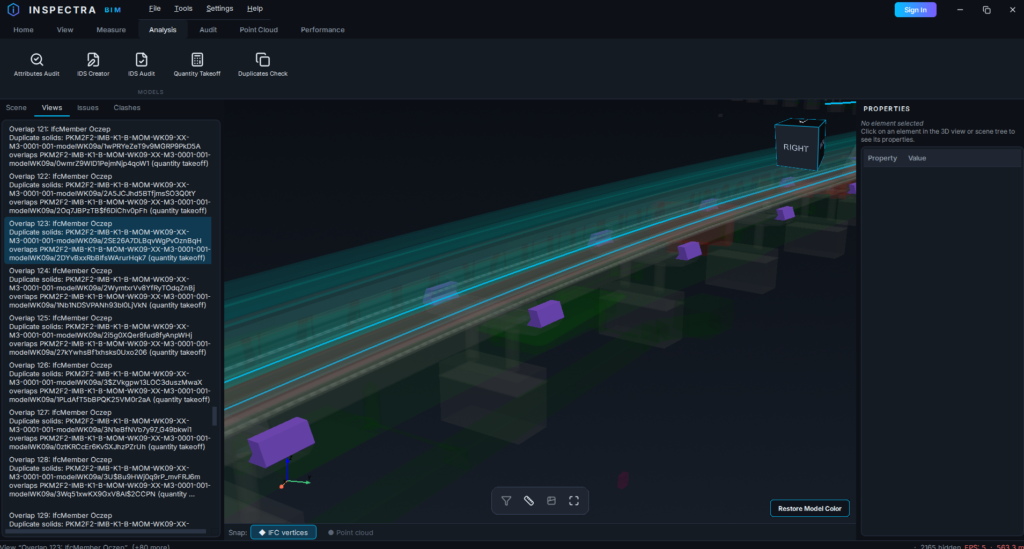
The same duplicate-detection engine as a standalone tool. Run it on any selection of models and Inspectra will:
- find every pair of identical, fully overlapping solids (equal volume + coincident centroid),
- highlight them in the scene (pick your own colour),
- create a saved View for every case, with the rest of the model faded to 90% transparency — flip through the views and each duplicate is impossible to miss.
One “Restore Model Color” click brings the scene back to normal.
🔖 Views — now in Free
Saved views graduate to the Free edition: capture camera, visibility, filters and section state, manage them in the new Views panel, and export/import them as files to share with your team. Duplicates Check plugs straight into it, one view per finding.
Quality of life
- Model pickers across the new tools support filtering by part of the file name — type
ARCH, click Check shown, done. - Tool settings persist between sessions, and takeoff/check configurations are remembered per project setup.
Download Inspectra BIM 0.2.0 from our website — free, as always.
In the lab: the Inspectra Audit module — clash detection with attribute-based selection, review workflows with tags and statuses, coordination reports with per-clash screenshots, and BI-ready data exports. Coming to early access soon.
Try it on your own model
Inspectra BIM Free opens IFC, E57/LAS and XML locally — no plugins, no cloud.