Release10 July 2026·2 min read
Inspectra BIM 0.1.3 — Smooth Sailing on Big Models
Version 0.1.3 of Inspectra BIM Free is out. This release focuses on two things you feel every day: navigation performance on heavy federated models and a brand-new native scene file that captures your whole working session. Here’s what changed since 0.1.2.
🚀 Big-model performance, reworked
Large federated IFC scenes are where viewers usually give up — so we went deep:
- Rock-solid orbit. Camera rotation was rebuilt as a deterministic Z-locked turntable. No more roll “wobble”, no more camera jumps at the start of a drag — even on scenes with thousands of elements, rotation stays glued to your mouse.
- Smart level-of-detail while navigating. While you orbit or pan, Inspectra temporarily drops sub-pixel geometry and restores it the moment you stop — big scenes stay fluid without ever looking degraded at rest.
- Instant recoloring & selection. Color and transparency changes now update in place on the GPU instead of rebuilding geometry. Highlighting, selection and audit overlays respond immediately, even on very large models.
📦 New: Inspectra scene files (.ins)
Save your entire session into a single portable file:
- Standalone mode embeds the tessellated geometry and now the full element data — attributes, property sets and quantities. Send one file; the recipient opens it, clicks any element and sees its properties, no source IFC files needed.
- Reference mode stores just paths and settings — a tiny file that reloads your models from disk, with relative or absolute path styles for network drives and shared folders.
- Incremental saving. Geometry is written once. Saving again after reviewing — new views, hidden elements, section cuts, filters — updates only the scene state in milliseconds, instead of repacking gigabytes. Add a model and only the newcomer gets embedded; rebuild a source IFC and Inspectra notices and refreshes it automatically.
- A clear progress window shows exactly what’s being packed during large saves.
📋 Reporting & workflow improvements
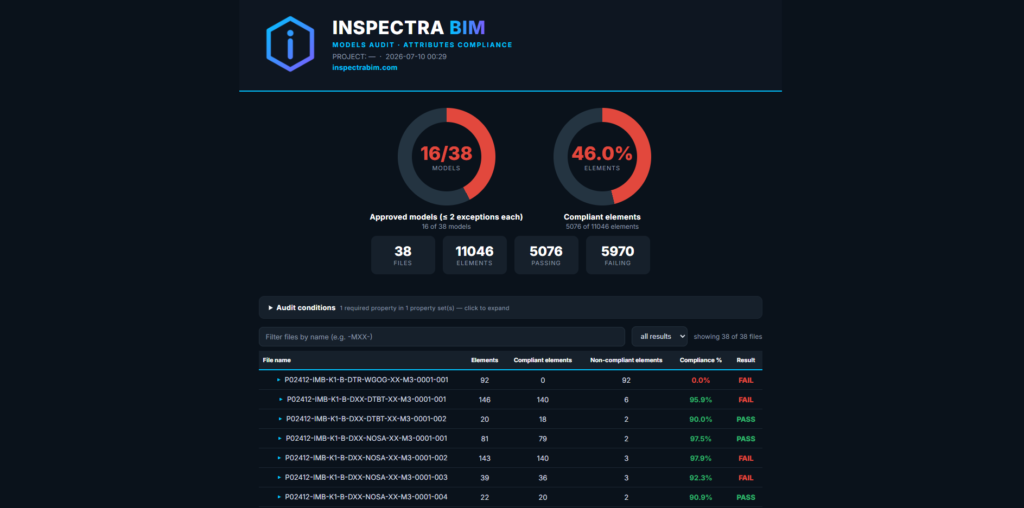
- PASS/FAIL Result column in audit reports (HTML + Excel), with one-click filtering — see failing files instantly.
- Compact audit summary — results at a glance: models passed, elements passed, percentages.
- Report generation now runs in the background with a progress indicator — no more frozen window on large exports.
- Optional exit confirmation (Settings) so an accidental close never costs you an unsaved session.
🔧 Under the hood
- Faster scene saving thanks to smarter compression tuned for geometry data.
- Dozens of stability fixes around selection, deselection and mouse handling.
Download Inspectra BIM 0.1.3 from our website. As always — free, fast, and built for real BIM workflows.
Coming next: the Inspectra Audit module — clash detection, IDS validation and issue tracking — currently in internal testing.
Try it on your own model
Inspectra BIM Free opens IFC, E57/LAS and XML locally — no plugins, no cloud.