Inspectra BIM 0.11.0 — in-app updates, Polish interface, Open & Append, Color Sets
Inspectra BIM 0.11.0 is out. The headline: this is the last version you ever download from a browser — from now on Inspectra updates itself. Alongside that: the interface learns Polish, opening files splits into a proper Open/Append pair, the Audit module gains discipline colouring with Color Sets, and a performance hunt made navigating scenes with translucent terrain silky. Here is what changed since 0.10.0.
Inspectra updates itself now
When a new version is available, the update window offers Download & Install. Click it and Inspectra fetches the installer with a progress bar, verifies its checksum and the publisher’s digital signature, asks for your confirmation — with the usual prompt to save unsaved work — then closes, updates and reopens by itself. No browser, no hunting for the setup file, no losing your place.
A few deliberate guarantees:
- Nothing ever downloads without your explicit click. The startup check stays a passive, once-a-day notification, and you can keep using the “open download page” route if you prefer.
- Verification is mandatory. A file that fails the checksum or is not signed by us is deleted, never run.
- Licence changes are never silent. If a new version revises the licence agreement, the installer shows it for re-acceptance before updating; otherwise the update installs quietly and brings the app right back.
We also fixed the update notification itself — in earlier builds the “new version available” window could fail to appear at all. If Inspectra never told you about 0.10.0, this is why; 0.11.0 puts the messenger back on duty.
The interface speaks Polish
Settings → Language now offers English (default) and Polski. The choice applies after a restart and covers the whole main window — every ribbon tab, tile, group, menu, tool and tooltip, translated with proper Polish engineering vocabulary (przekroje, wymiary, kilometraż, zagadnienia, kolizje). The remaining dialogs and messages switch over in the coming updates.
Open and Append — opening files, done properly
Opening files now works the way coordination tools should:
- Open (Ctrl+O) opens a file as a new document: the current scene closes — with a save prompt — and the picked files load fresh. Use it to switch projects or return to a saved scene. The recent-files list under the Open tile now also remembers scenes you saved, so a freshly created
.insis one click away. - Append (Ctrl+Shift+O, a new tile next to Open) adds model files to the current scene — that is how a federation is built: architecture, then structure, then utilities. It works on an empty scene too. Scene files stay documents: an
.insalways goes through Open. - Drag & drop follows the same logic: dropped models are appended; a dropped scene opens (with the save prompt).
If you are used to the old behaviour — Open always piling files into the scene — the Append tile is your new muscle-memory target.
Color Sets — discipline colouring for coordination (Audit)
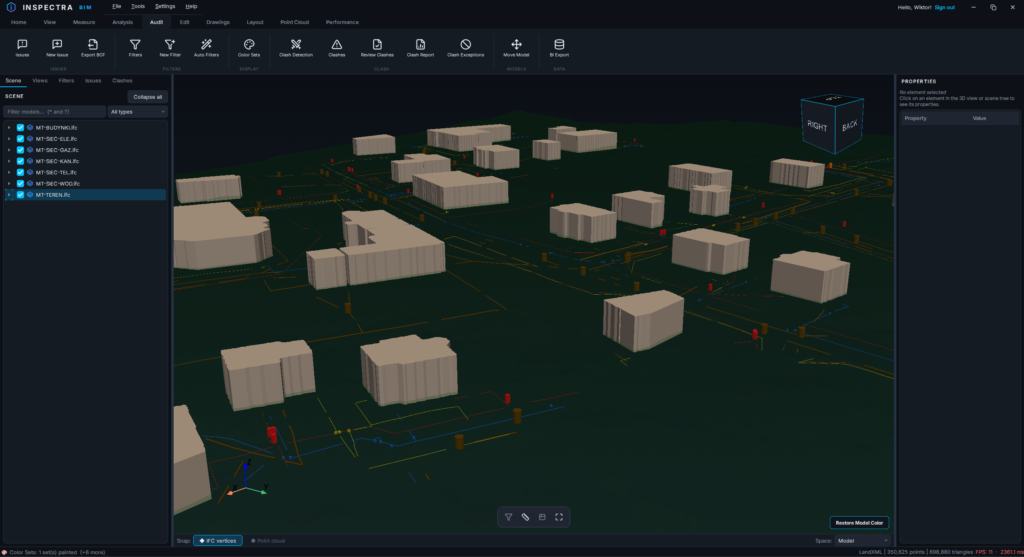
A new tool on the Audit tab: colour the scene by source file and/or saved filter. One click of Add All Files gives every discipline its own colour; put filter rows above file rows to pick specific elements out of a file’s colour; give rows their own transparency; and decide what happens to everything else — keep original colours, fade it out, or drop it to a grey backdrop for that classic “my scope in colour, context ghosted” review look.
The best part: Save as View stores a colouring as a colour-only saved view. Activating it repaints the scene without moving the camera, the recipe comes back for editing, and the views travel with the .ins — so an office colouring standard is set up once and reused by the whole team.
Representation Rules, refined (Edit)
The per-drawing representation rules got a quality-of-life round:
- The window now floats — keep it open while you work on the drawing.
- A pick button on each rule: minimize, click an element on the drawing, and the rule fills itself with that element’s file or IFC class.
- Rules open collapsed (no more window inflation), with new move-to-top/bottom arrows for quick priority changes.
- A rule that hides all line bands now behaves exactly like manually hiding those elements: they leave the hidden-line analysis and stop occluding what is behind them.
- Fixed: deleting a rule and closing the window with Esc silently brought it back; the colour picker opened tinted when invoked from a rule; and there is now an explicit “back to (keep)” button next to every colour swatch.
Accurate dimensions on longitudinal sections (Edit)
An accuracy pass on the 2D side, prompted by a sharp-eyed designer:
- Dimensions on distorted-scale profiles (1:100/1:1000) now measure true lengths — previously a linear dimension on a 1:10 distorted view read ten times short.
- Elevation dimensions on longitudinal sections read the point’s real elevation (they used to add the alignment’s own height).
- Coordinate dimensions follow the curved axis instead of its chord.
The section geometry itself was verified numerically against a curved alignment — the unrolled curtain is exact to a fraction of a millimetre over hundreds of metres.
Performance: translucent terrain, thin models, empty-space scrolling
If you ever set a large TIN to semi-transparent and watched the frame rate fall off a cliff, this release is for you:
- Terrain-only transparency now renders in a single pass — measured on a 5.3-million-triangle TIN, a translucent terrain costs within a few percent of an opaque one, instead of halving the frame rate.
- Grabbing the model to orbit with a translucent terrain used to stall for up to a second per grab — the pivot anchoring was walking the whole scene and discarding the result. It now reads the depth buffer instead: ~5 ms, and the pivot finally lands on the transparent surface.
- The same rework gives pivot picking a small search radius: on utilities models made of thin cables and pipes, clicking near an element now anchors the orbit on it — while empty space never produces a phantom pivot, and scrolling over empty space no longer stutters.
Small things you will notice
- Drawing tools show a crosshair cursor whenever any tool is armed — sketching, text, dimensions, labels — so it is always clear whether the next click will draw.
- On dual-GPU laptops the installer registers Inspectra with Windows as a high-performance graphics app, so the discrete card is used by default (a manual choice you made in Windows Settings is never overwritten).
- The annotation styles tile is now called Annotation Styles, matching the Text/Label/Dimension style hierarchy introduced in 0.10.0.
Get Inspectra BIM 0.11.0
Download the installer from inspectrabim.com — the update installs over your existing version and keeps your licence and settings. It is the last time you need to: starting with this version, Inspectra will offer new releases in-app, one click away.
Color Sets requires the Audit module; the drawing improvements are part of Edit; the updater, Polish interface, Open/Append and every performance fix ship in all tiers, including the free viewer.
Try it on your own model
Inspectra BIM Free opens IFC, E57/LAS and XML locally — no plugins, no cloud.