Inspectra BIM 1.0.1 — measuring on point clouds, rebuilt
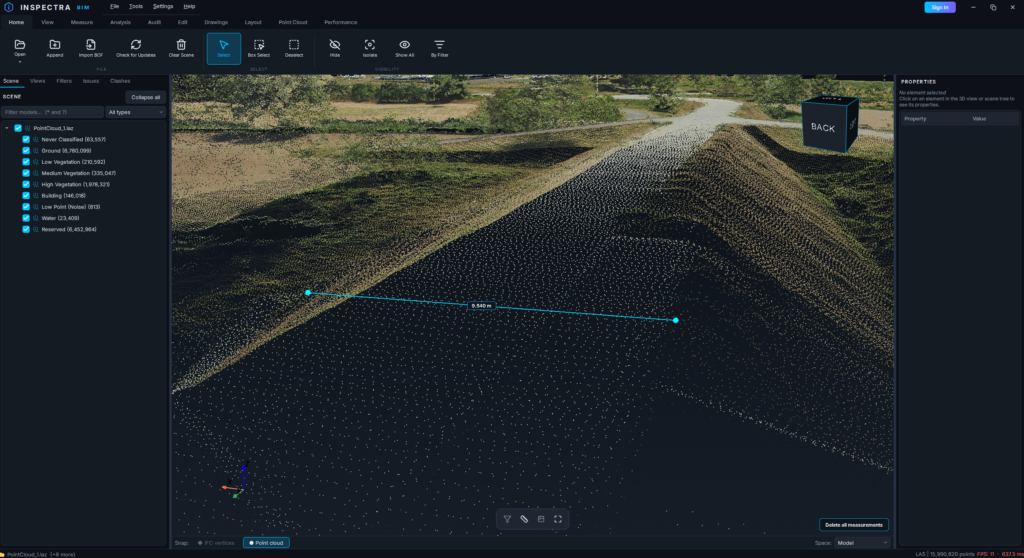
This release does one thing, and does it thoroughly: it fixes snapping when you measure on a point cloud. If you have ever placed a distance on a scan and watched the vertex settle slightly above the surface — or lost a snap because the cursor was two pixels off a point — this update is for you.
The work started with a single user report: “I couldn’t measure between a point in the cloud and a point in the IFC model.” Following that thread led through four separate defects, each hiding behind the one in front of it.
Snapping now works like the navigation pivot
The old cloud snap tested a single pixel under the cursor, plus a small ring around it. A rendered point is about three pixels wide, so unless you hit it dead centre, the snap marker simply vanished. Measuring meant hunting.
Snapping now reads a whole aperture of the depth buffer around the cursor — the same technique the navigation pivot has always used — and walks the rendered fragments from the nearest one outwards until it finds one that belongs to a point cloud. In practice: aim near a point and the marker locks onto it. Because the candidates come from what was actually drawn on screen, the marker can never land in empty air, and occlusion and section cuts are respected automatically.
The click then commits the exact point whose sprite you are looking at, not an approximation of it.
The vertex lands where the marker is
Three separate problems used to push the committed vertex away from the marker:
- Mouse-event coalescing. Windows can deliver the button release a pixel or two away from where you were hovering. The snap ran again at those coordinates and, on terrain viewed at a shallow angle, the neighbouring pixel can be a point twenty metres further along the surface. A click within a few pixels of your last hover now reuses that hover’s result — what the marker shows is what gets placed.
- Sprite edges. The aperture finds a point by its edge pixel, which sits half a sprite away from the point’s true centre. The commit now resolves the actual point from the cloud data instead of trusting the edge.
- Depth-buffer feedback. This was the subtle one. The snap marker itself is drawn into the depth buffer, so a stationary cursor was reading the marker’s own footprint on the next mouse move and drifting the marker toward the camera — a few metres per movement when zoomed out, which is exactly why the problem looked “distance-dependent”. Measurement overlays are now excluded from every depth read, and a stationary cursor holds its lock instead of re-deriving it.
Zoomed-out measurements are accurate again
Two further fixes matter mostly at distance, where the errors were largest:
- The aperture covers a fixed number of pixels, so the further away the camera is, the more metres it spans — and it kept catching isolated noise points floating above the terrain. Assisted snaps now prefer points backed by their neighbourhood (the dense mass, a line of points) over lone strays. Aiming directly at a single point — a survey marker, a power line against the sky — still works exactly as before.
- Depth values are only meaningful under the camera’s clipping range from the frame that wrote them, and Inspectra re-tunes that range every frame for precision. Snapping and the pivot now convert depth using the range the buffer was actually written with.
Measured on a 13-million-point scan: hovering near a point locks onto it across every zoom level, a click with normal hand movement stays on the hovered point, and repeated hovers hold position exactly instead of creeping.
Model geometry too
The IFC side received the same treatment. Snapping to thin elements — pipes, cables, conduit — no longer gives up when the cursor is a few pixels off, because a near miss is rescued to the nearest rendered fragment. Two new guards stop the picker from grabbing geometry you cannot see: nothing is snapped when nothing is rendered under the cursor, and a point sitting far behind what is visible is rejected as a through-the-gap grab. Surfaces hidden by an active section are no longer valid targets either.
And when a click genuinely has nothing to snap to, the snap bar now says so — including a hint to switch snap mode when you are pointing at a cloud in IFC mode, or at the model in cloud mode. That was the original report, and it is now a two-second fix instead of a mystery.
Updating: Help → Check for Updates → Download & Install. The licence agreement is unchanged from 1.0.0, so this update installs quietly and restarts the program for you.
Try it on your own model
Inspectra BIM Free opens IFC, E57/LAS and XML locally — no plugins, no cloud.