Body
Inspectra BIM 1.3.0 is out. Two features lead this release, and both come from everyday work on linear infrastructure: Gauge Check, which tests a model against a clearance gauge along the whole alignment, and Edit Alignment, which makes a new alignment out of an existing one (reshaped, offset or with new chainage) and exports it to LandXML or IFC 4.3. Around them: clash detection about ten times faster, a Model Versions comparison and a set of smaller improvements.
Clearance gauges: define, check, inspect (Audit)
Sooner or later, every model review on a railway or road project has to answer the same question: does anything reach into the clearance gauge? A mast set too close to the track on a curve, a viaduct deck lower than the gauge allows, a platform canopy, a noise barrier. Until now that meant cutting cross-sections by hand at chosen chainages. In 1.3 the Audit tab has a new Gauge group with two tools that check the whole alignment instead.
Clearance Gauge defines the gauge:
- Templates from the standards. The PKP PLK structure gauges (GPL-1 and GPL-2, plus G1, G2, GA, GB and GC in nominal and limit variants, with an optional pantograph gauge for electrified lines) and the WR-D-21 road gauges: carriageway by road class, sidewalk, cycle path, tram, technological lane and service walkway. Template parameters stay editable.
- Widening and cant. Rail and tram gauges widen on curves by the rule of their standard. Cant can be a constant value on the circular curves, ramped along the transitions, or the cant the alignment file itself carries, read from LandXML
<Cant>or IFC 4.3IfcAlignmentCant. With Tilt the gauge with the cant, the profile turns with the track. - Your own profiles. The Profile Editor builds a cross-section point by point or by dragging the points, imports an outline from DXF, and keeps profiles in libraries that you can export to a file and share with colleagues.
- Into the scene. The gauge runs along any alignment with chainage, from IFC or LandXML, over its whole length or a chosen range, with a 3D preview. Add to Scene saves it as IFC and loads it as a model, so clash detection can use it as well; Export IFC… writes all gauges into one file.
Gauge Check tests the model against it:
- The gauge can be one defined in Clearance Gauge, or gauge solids modelled by someone else, taken from a filter or picked in the model.
- You choose the elements to check the same way as a side of a clash test, then the chainage range, the step between cross-sections and a threshold. Flag clearances under 200 mm reports not only what is inside the gauge but also what comes too close to it.
- Each cross-section cuts the actual geometry of the elements with a plane square to the alignment. A long deck slab over the track or a wall on a tight curve is measured where it really is, not where its bounding box suggests.
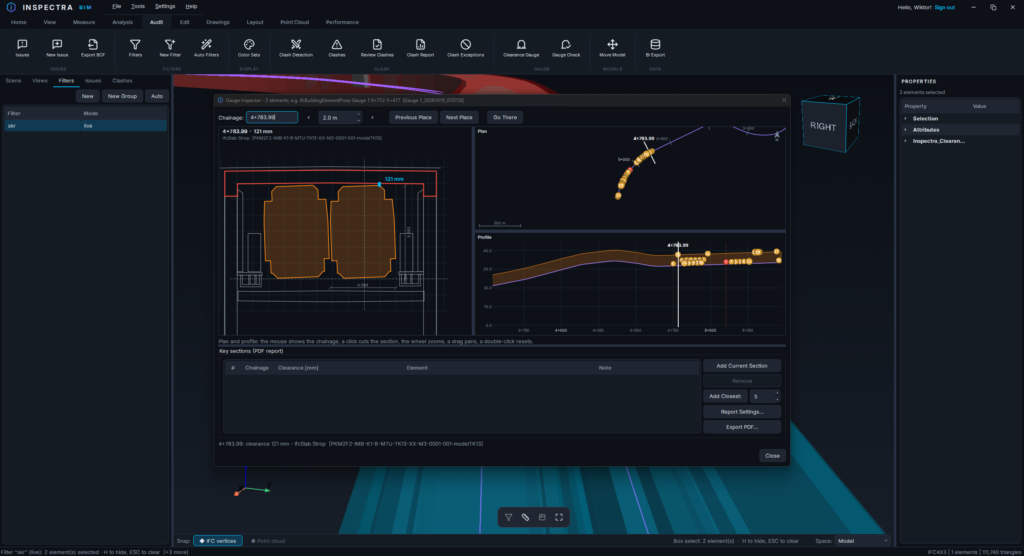
- The result is a numbered list of places with chainage, clearance in millimetres and the element. Go There puts the camera inside the gauge at that place, with the gauge outline drawn in red.
- From the result you can create a view with only those elements, or save the check as a clash test: every flagged element becomes a clash that is reviewed, grouped, reported, exported to BCF and re-run like any other.
- Reports in interactive HTML and PDF, with your company logo next to ours (Report Settings…).
Gauge Inspector is for going through the places one by one: the cross-section at any chainage, with dimensions to the nearest elements, beside the plan and the profile. Hovering over the plan shows the chainage, and a click cuts the section there. Mark key sections yourself or let Add Closest add each element’s tightest spot, then export them to PDF: one page per section, with its position on the plan and the profile and your note.
Edit Alignment: a new alignment from an existing one (Edit)
The second headline feature works on the alignment itself. Edit Alignment (Edit tab → Alignment, or right-click an alignment in the scene) takes any alignment from IFC or LandXML, reads its design back from the file and lets you change it:
- Points: the start point, each PI with its radius and transition lengths, the end point. Drag them in the plan or type the values.
- Elements: the element chain itself, with lines, arcs and transitions (clothoid, Bloss, cosine, sine, Helmert), their lengths and radii.
- Profil: the vertical alignment by its PVIs, with parabolic or circular vertical curves. Drag the PVIs in the profile view, or shift the whole profile up or down.
- Cant: rail head heights along the alignment, or a new cant table for an alignment that had none.
- Offset & Chainage: a parallel alignment to the left or right, in two modes. Design moves the tangents, keeps the arcs concentric and builds new transitions, so the result stays editable by points. Exact makes the transitions follow the true parallel in short clothoid pieces, within 0.1 mm. The chainage can be renumbered while the profile and the cant keep their places along the alignment.
The plan and the profile show your edit over the original, with Undo, Redo and Reset at hand. The result exports to LandXML lub IFC 4.3 and can go straight into the scene under its own name and colour (by default a lighter shade of the original).
Alignments in the scene can now also be renamed and recoloured from the model tree or the 3D view, in every edition including Free.
Also in 1.3
Audit
- Model Versions: attach an earlier version of a model and see the changes as a view. Unchanged elements are green, new and changed ones cyan, the previous state of changed and removed ones red (colours configurable). Elements are matched by GlobalId, or by Tag, an attribute or identical geometry when the IDs were regenerated. Change list down to single properties, HTML and Excel reports.
- Clash detection about ten times faster: our benchmark of 111 clash tests went from about nine minutes to under one, with results identical to 1.2.
- Treat as one solid for a side of a clash test, views that isolate the clashing elements, Review Clashes in two panels, Auto Group across several tests with chainage from a chosen alignment, logos in PDF and Excel clash reports and screenshots in HTML.
- The Issues and Filters tiles left the Audit ribbon; both panels are still in the left bar.
Edit and Drawings
- Longitudinal Section with an offset: the section can run parallel to the alignment, to the left or right of it, with the alignment’s grade line drawn stretched along it.
- Drawings: ANSI36 hatching, line weights in millimetres as in print (DXF layers included), copy and paste of annotations between drawings, faster snapping on large drawings.
- Geometry Check of volume and area attributes against the geometry, with an HTML and PDF report. Add Attribute to a filter or a selection, header and project data in Export IFC, units in Auto Attributes.
All editions
- Some IFC alignments, typically from Civil 3D road models, were drawn at the world origin, far from the model; they now sit where they belong.
- Alignments can be coloured by element type (Settings → Alignment Colours), and Remove Outliers also cleans up stray alignments.
- Attributes are read in the background after a model loads.
- Sign-in and updates work behind antivirus software that inspects HTTPS traffic.
Do pobrania
If you already use Inspectra, the update installs from inside the application; the installer for new users is on the website. Gauge Check and Model Versions are part of Audit; Edit Alignment and the drawing tools are part of Edit. Both modules are available as a 14-day demo for companies.
Download Inspectra · Pricing and demo
If you run a gauge check on one of your projects, tell us what it found, and what you expected it to find.
Production notes
- Featured image: the Gauge Inspector (section with dimensions beside the plan and profile) works best; the Edit Alignment window with its plan and profile as a second image.
- “About ten times faster” comes from our clash regression benchmark: 547 s in 1.2 against 49 s in 1.3, with identical results. Drop the number if you prefer not to publish it.
Wypróbuj na własnym modelu
Inspectra BIM Free otwiera IFC, E57/LAS i XML lokalnie — bez wtyczek, bez chmury.