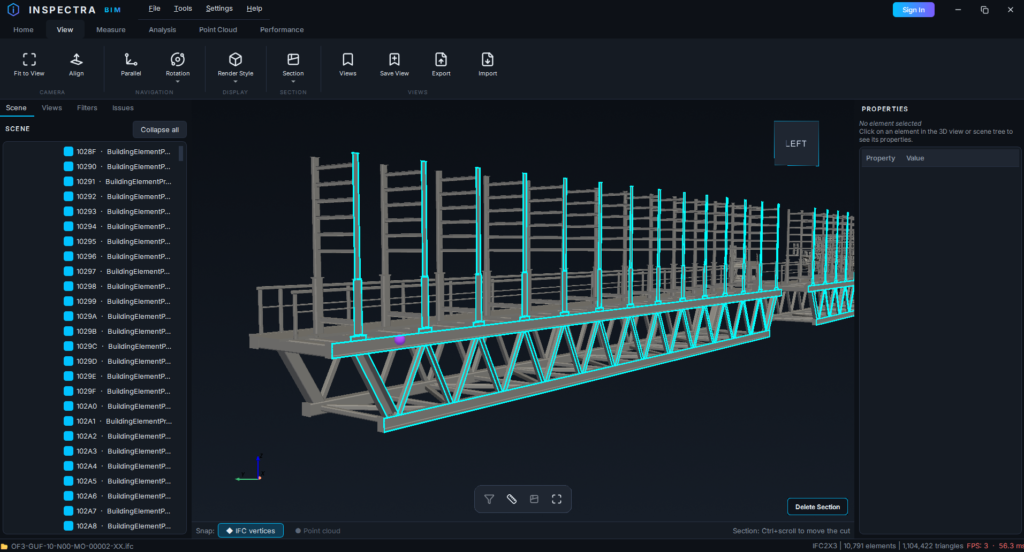
Inspectra BIM 0.4.0 — Filters: Find, Select and Hide Anything in Seconds
Version 0.4.0 of Inspectra BIM Free is out, and it is the biggest quality-of-life release so far. The headline: Filters — saved selection sets that turn “click every wall on level 3 one by one” into a single click. Alongside them: navigation that finally follows your cursor, attribute fields that autocomplete from your own models, and a completely rebuilt application core. Here’s everything that changed since 0.3.1.
Filters — saved selection sets
The left dock has a new tab: Filters. A filter is a named set of elements defined by rules on their data — IFC class, name, or any property from any pset. Build it once, use it all day:
- Condition builder — combine any number of conditions with AND/OR groups: class is IfcWall oraz FireRating is REI120; name contains “S03”; LoadBearing is true…
- Live or static — a live filter re-evaluates automatically as models are loaded and unloaded; a static one freezes the exact elements it matched when you saved it.
- One click to act — select or hide the whole set straight from the panel, instantly, even for thousands of elements.
- Organized and portable — arrange filters into groups and they travel inside your
.insscene files, so the whole team gets the same sets.
Type less — autocomplete everywhere
Every attribute field in the new filter dialogs is an autocompleting picker fed by the models you actually have open: property sets, properties and their values. Start typing “fire” and pick Pset_WallCommon → FireRating from the list — no more recalling exact pset names from memory.
Navigation that follows your cursor
- Zoom to cursor — the scroll wheel now dives toward the point under your pointer, not the center of the screen. Aim at a detail, scroll, and you’re there.
- Orbit around what you point at — rotation pivots where you grabbed the model, and the camera no longer drifts away from it during long orbits.
- Deliberate deselection — selection is cleared with Esc only, so a stray click into empty space doesn’t cost you a carefully built selection.
- Multi-selection properties — select many elements and the Properties panel shows the count plus every attribute the whole selection shares.
Smaller improvements
- Open IFC from Explorer — the installer can associate
.ifcfiles with Inspectra (optional — you choose during setup), and Inspectra appears in the “Open with” menu. - Quantity Takeoff, honest by default — duplicate element groups are annotated in the export and can keep exactly one copy per group, so double-modeled geometry doesn’t double your quantities.
- Remove Outliers report — an optional HTML report documents exactly which elements were removed.
- Scene tree: Collapse all — fold a deep spatial tree back to its roots with one click.
- Scene files keep your look — element transparency and full attribute data now survive
.inssave/load in every case. - Dropdown arrows are visible on the dark theme again.
Under the hood — a new engine room
0.4.0 ships as a completely new build of the application, compiled to native machine code. Day to day you’ll notice a leaner installation (about 0.7 GB on disk) and cleaner updates — upgrading removes all leftovers of the previous layout automatically. The installation folder now also includes a THIRD_PARTY_LICENSES.txt documenting the open-source components Inspectra builds on.
Do pobrania
Download Inspectra BIM 0.4.0 Free from the website — the installer upgrades any previous version in place, keeping your settings and license. If you’re on 0.1.2 or newer, the app will let you know an update is available.
Inspectra BIM — szybka, natywna przeglądarka IFC i chmur punktów dla Windows.
Wypróbuj na własnym modelu
Inspectra BIM Free otwiera IFC, E57/LAS i XML lokalnie — bez wtyczek, bez chmury.