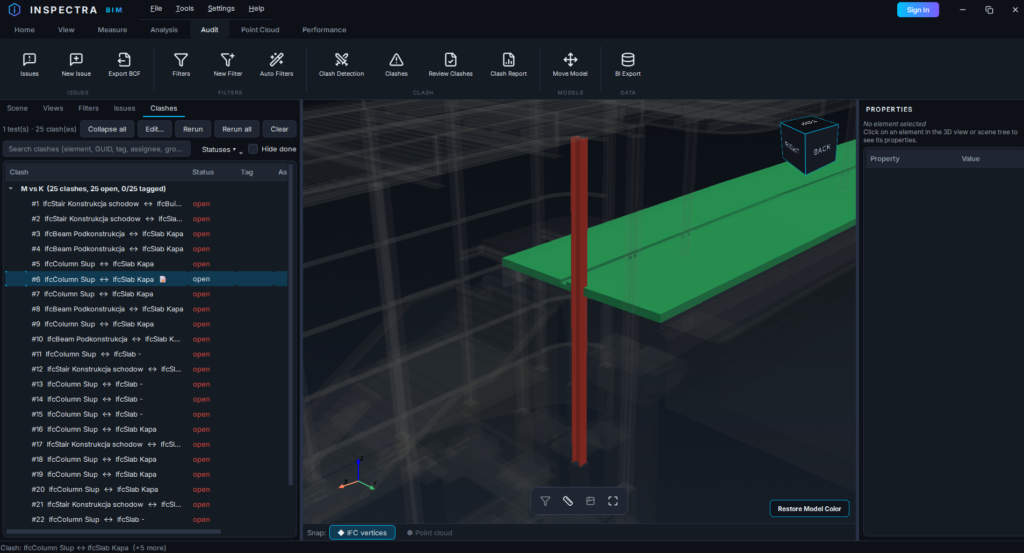
Inspectra BIM 0.5.0 — pierwsze spojrzenie na Audit
Wersja 0.5.0 to jak dotąd największe wydanie Inspectra BIM. Przynosi pierwsze spojrzenie na Inspectra Audit — nasz moduł koordynacji dla koordynatorów i menedżerów BIM — i zamienia darmową przeglądarkę w prawdziwe narzędzie współpracy dla wszystkich w projekcie. Oto co zmieniło się od 0.4.0.
Zajawka: Inspectra Audit — detekcja kolizji i koordynacja
Audit zakończył fazę testów i czeka teraz na wydanie. Moduł jest dostarczany wewnątrz 0.5.0, więc każde narzędzie widać już w aplikacji — karta Audit i jej kafelki są widoczne, ale zablokowane i nie można ich jeszcze używać. Sklep otworzy się za jakiś czas; pełna premiera przyjdzie z wersją 1.0.0, a każda funkcja Audit dostanie tu wcześniej własne szczegółowe omówienie.
Co przynosi Audit:
- Detekcja kolizji między dowolnymi modelami, klasami, zaznaczeniami po atrybutach albo zapisanymi filtrami — kolizje twarde z tolerancją przenikania, a także testy prześwitów (“zachowaj 50 mm wokół kanałów”). Reguły ignorowania (ten sam plik, ta sama kondygnacja, ta sama grupa), obsługa zawierania oraz Clash Matrix który uruchamia całą baterię testów za jednym razem.
- Przepływ przeglądu — statusy, tagi, osoby przypisane i grupy kolizji; dedykowane okno przeglądu z nawigacją z klawiatury; każda kolizja może stać się issue (pojedynczo albo masowo), które pamięta swoje ujęcie kamery i podświetloną parę elementów.
- Powtórzenia, które rozumieją, że Twój model się zmienił. Aktualizacja testu nie tworzy drugiej listy — uzgadnia ją: kolizje nadal występujące zachowują swoje numery, tagi i powiązania ze zgłoszeniami, naprawione stają się resolved, a powracające otwierają się ponownie. Dopasowanie działa po GUID, a dla modeli wygenerowanych na nowo — po geometrii.
- Reports w HTML, Excelu, XML i PDF — ze zrzutami dla każdej kolizji, podziałem na testy albo osoby przypisane oraz opcjonalną sekcją trendu pokazującą, jak liczba kolizji spada z przebiegu na przebieg.
- Do tego: tworzenie zapisanych filtrów i filtrów automatycznych, eksport BCF 2.1, Move Model (przesunięcie / obrót / dopasowanie dwupunktowe) i eksport BI.
Chcesz wiedzieć w chwili, gdy Audit ruszy? Załóż darmowe konto na inspectrabim.com/account i włącz powiadomienia o produkcie w swoim panelu — napiszemy, gdy otworzy się sklep i gdy zadebiutuje 1.0.0.
Free dostał ulepszenie współpracy
- Pracujcie razem na jednym pliku sceny. Otwórz scenę
.insscenę, odpowiadaj na zgłoszenia i zmieniaj ich statusy — a potem zapisz te zmiany z powrotem do pliku. Dwie osoby mogą edytować naraz: zapisy scalają się, nic nie ginie, a program informuje, gdy plik zmienił się na dysku. - Sam zweryfikuj swoje poprawki. Jeśli zgłoszenie powstało z kolizji, kliknij je prawym i wybierz Rerun clash check: po ponownym wyeksportowaniu IFC para jest testowana jeszcze raz z pierwotnymi ustawieniami testu. Wynik trafia do nowego Clash log, a rozwiązana kolizja zamyka zgłoszenie automatycznie (status auto closed; otwiera się ponownie, jeśli kolizja wróci).
- Check for Updates (karta Home) — program wykrywa, które powiązane pliki IFC wyeksportowano ponownie, i przeładowuje tylko te, a nie całą scenę.
- Prawdziwe nazwiska, prawdziwa odpowiedzialność. Odpowiadanie, zmiana statusów i uruchamianie testów wymagają teraz zalogowania, a każdy wpis jest podpisany Twoim pełnym imieniem i nazwiskiem z rejestracji.
- import BCF pozostaje darmowy — z uczciwym komunikatem: zaimportowane tematy są w Free tylko do odczytu (tworzenie zgłoszeń to funkcja Audit).
- Panel zgłoszeń dorósł: filtry kolumn w stylu Excela, terminy z podświetlaniem przeterminowanych, masowa zmiana statusów i tagów.
- Przeprojektowane przyciąganie w pomiarach — przyciąganie preferuje teraz narożniki, potem krawędzie, potem powierzchnie, i pozostaje dokładne w widokach perspektywicznych oraz na małych ściankach.
- Panel Properties pokazuje, z którego pliku modelu pochodzi element; szerokość kolumn można zmieniać.
- Nowe, firmowe okno logowania oraz Help → Collect Diagnostics do wsparcia — raport nie zawiera danych modelu i zaciemnia nazwy plików.
Pod maską
- Silnik kolizji uruchamia teraz w spakowanej aplikacji prekompilowany kod maszynowy — faza dokładna jest mniej więcej 9× szybsza niż czysto pythonowa ścieżka zapasowa i skaluje się na rdzenie procesora. Pierwsze uruchomienie kolizji po instalacji kompiluje raz; każda kolejna sesja startuje natychmiast z pamięci podręcznej.
- Windows 10 (64-bit) jest w pełni wspierany obok Windows 11.
- Settings → About Third-Party Licenses wypisuje każdy komponent firm trzecich dostarczany z aplikacją i licencje, na których jest używany.
Do pobrania
Pobierz Inspectra BIM 0.5.0 ze strony inspectrabim.com/download — darmowa przeglądarka nie wymaga konta. Aby dostać znak, gdy Audit zadebiutuje wraz z 1.0.0, załóż darmowe konto na inspectrabim.com/account i włącz powiadomienia o produkcie w swoim panelu.
Wypróbuj na własnym modelu
Inspectra BIM Free otwiera IFC, E57/LAS i XML lokalnie — bez wtyczek, bez chmury.