Inspectra BIM 0.7.0 — osie tras z kilometrażem, przekroje poprzeczne wzdłuż osi i szybsze wszystko
Wersja 0.7.0 to największe wydanie darmowej wersji od premiery przeglądarki. Uczy Inspectrę języka infrastruktury liniowej — osie, kilometraż, przekroje poprzeczne — i łączy to z rundą prac nad wydajnością, którą poczujesz na każdym ciężkim modelu federowanym, niezależnie od tego, czy budujesz mosty, czy budynki.
Osie tras stają się pełnoprawne
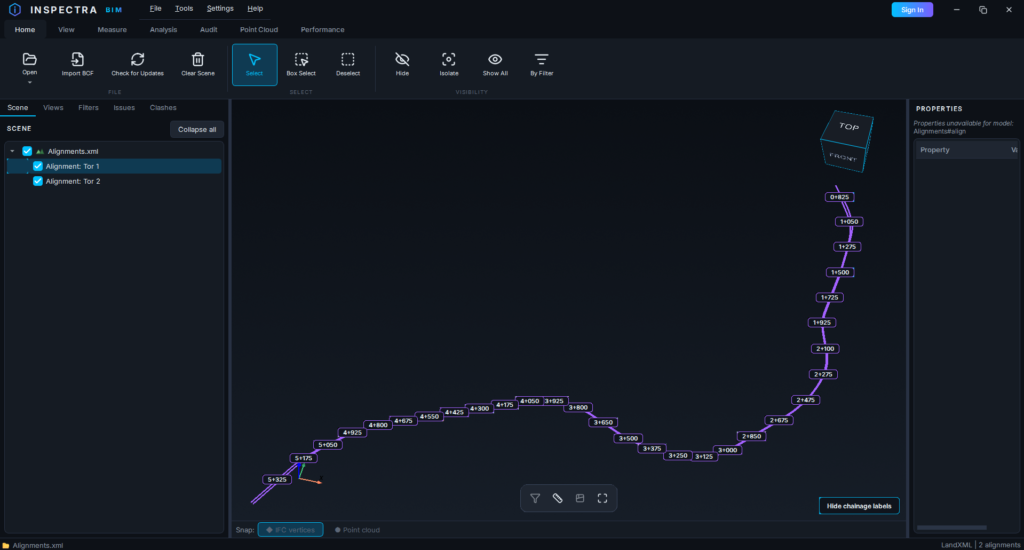
Modele drogowe i kolejowe kręcą się wokół osi, a Inspectra traktuje to teraz właśnie tak. Pliki IFC 4.3 już wcześniej pokazywały swoje IfcAlignment osie jako cyjanowe linie; 0.7.0 dokłada drugą połowę realnych projektów: niwelety importowane z LandXML. Wyeksportuj oś z Civil 3D (albo dowolnego narzędzia zapisującego LandXML), otwórz plik w Inspectrze, a geometria pozioma — proste, łuki i klotoidy, wyliczone porządnie, a nie przybliżone cięciwami — łączy się z profilem pionowym w prawdziwą oś 3D. Na testowej osi o długości 4,7 km odtworzona długość zgadza się z deklarowaną co do milimetra.
Plik z kilkoma osiami pojawia się w drzewie sceny jako własne małe drzewo, po jednym zaznaczalnym wierszu na oś. Osie z XML renderują się purple, te z IFC pozostają cyjanowe, więc zawsze wiesz, na co patrzysz — a wszystko poniżej działa identycznie dla obu.
Osie są teraz także klikalne. Kliknięcie podświetla linię i wypełnia panel Properties jej dowodem tożsamości: nazwa, źródło, kilometraż początkowy i końcowy, długość, zakres rzędnych. Esc przywraca stan poprzedni.
Kilometraż na modelu, a nie w głowie
Kliknij prawym dowolną oś w drzewie sceny i wybierz Show Chainage Labels: znaczniki kilometrowe w znanym 3+144 format pojawia się wzdłuż linii, na dowolnej liczbie osi. Odstęp dobiera się sam z długości osi, a jeśli standard Twojego biura mówi inaczej, Settings → Chainage Label Spacing ustawia go dowolnie od co 10 m do co 1000 m.
Dwa szczegóły sprawiają, że etykiety dają się znieść, zamiast być gadżetem. Oddal widok, a same się przerzedzą — zamiast ściany nakładających się etykiet dostajesz rzadki, czytelny podzbiór, który gęstnieje w miarę zbliżania. A gdy orbitujesz albo przesuwasz, etykiety usuwają się całkiem i wracają w chwili, gdy puścisz, więc w pełni opisana oś 5 km nie kosztuje Cię nic z płynności. Pływający Hide chainage labels przycisk w rogu czyści wszystkie osie naraz.
Odczytaj kilometraż w dowolnym miejscu: Measure Alignment
Karta Measure zyskuje Alignment narzędzie. Kliknij dowolny punkt na osi, a Inspectra odpowie na dwa pytania, które inżynierowie tam naprawdę zadają: jaki to kilometraż i jaka jest rzędna projektowa? Odczyt zostaje na modelu jako obrączkowany znacznik z etykietą — Tor 1 · km 3+144.25 · H = 16.20 m — i usuwa się jak każdy inny pomiar. Kilometraż pochodzi z własnej tabeli kilometrażu osi (łącznie z kilometrażem początkowym), a nie ze zgadywania.
Przekroje poprzeczne podążające za trasą
To funkcja, dla której powstała reszta. Kafelek Section ma nowy tryb: From Alignment. Kliknij oś, a pojawi się płaszczyzna tnąca prostopadła do niej i idealnie pionowa — prawdziwy inżynierski przekrój poprzeczny, dokładnie w wybranym kilometrażu.
Fioletowa kulka siedzi tam, gdzie oś przebija płaszczyznę. Przeciągnij ją, a przekrój przesuwa się wzdłuż trasy, w obie strony, obracając się wraz z krzywizną osi tak, by pozostać prostopadły w każdym kilometrażu; Ctrl+scroll krokuje go precyzyjnie. Pomiar wewnątrz cięcia działa dokładnie tak jak od 0.6.0.
Przy okazji każdy przekrój płaszczyznowy — Surface, Global i nowy po osi — zyskał pływający Flip Section przycisk, więc zachowanie other strony cięcia nie oznacza już budowania go od nowa.
Osie tras osadzają się w samodzielnych .ins scenach jak wszystko inne: wyślij plik, a kolega dostanie razem z nim osie, kilometraż i przekroje.
Szybsze znajdowanie zgłoszeń
Wyszukiwarka zgłoszeń filtruje teraz po nazwa pliku and by any zapisany zbiór filtrów, obok tekstu, statusu, tagu i daty. “Pokaż mi otwarte zgłoszenia na modelu instalacyjnym” to dwa kliknięcia.
Runda wydajnościowa
Każde wydanie powinno coś oddać osobom z ciężkimi modelami. To daje sporo:
- Przybliżanie jest teraz płynne. Orbitowanie i przesuwanie naprawiono we wcześniejszych wydaniach; kółko myszy było ostatnim ruchem, który wciąż się zacinał. Korzysta teraz z tej samej maszynerii — podczas przybliżania scena tymczasowo zrzuca ozdobny balast (detal chmury punktów, krawędzie charakterystyczne, elementy subpikselowe) i przywraca go w chwili, gdy przestajesz.
- Ciężkie sceny mądrzej upraszczają się podczas ruchu. Przezroczyste nakładki schodzą na tańszą ścieżkę renderowania na czas przeciągania, tylne ściany brył zamkniętych są pomijane, a jeśli klatki nadal trwają zbyt długo, najmniejsze elementy na ekranie stopniowo ustępują miejsca. Wszystko wraca co do piksela po puszczeniu.
- Ponowne otwieranie modeli jest radykalnie szybsze. Model, który jest już w pamięci podręcznej geometrii, w ogóle nie parsuje ponownie swojego pliku IFC — właściwości elementów wczytują się w tle, gotowe, zanim cokolwiek klikniesz. Pierwsze wczytania dużych modeli też są zauważalnie krótsze, a drzewo sceny buduje się teraz bez zamrażania okna. Jedna uwaga: pierwszy start po aktualizacji raz odbudowuje pamięć podręczną geometrii — tak ma być.
- Poprawka precyzji dla rozciągniętych scen. Pojedynczy zbłąkany element leżący kilometry poza faktycznym terenem potrafił sprawić, że every model w scenie renderował się z poszarpanymi, skwantowanymi krawędziami. Początek układu sceny ignoruje teraz takie odstające elementy, więc Twoja geometria pozostaje ostra — a log informuje, że zbłąkany element istnieje, żebyś mógł wyczyścić model źródłowy.
Wewnątrz Audit (przed premierą)
Audit — detekcja kolizji, koordynacja i raportowanie — dojrzewa dalej, czekając na premierę. 0.7.0 dokłada Clash Exceptions: wielokrotnego użytku pary zaznaczeń (pliki, atrybuty albo zapisane filtry), które test kolizji ma świadomie ignorować — zaprojektowane przejścia w tulejach, uzgodnione nakładki. Wyjątki mieszkają w bibliotece, dołączają się do dowolnego testu, eksportują i importują jako plik, by wędrować między maszynami, a każdy test pamięta dokładnie, z jakimi wyjątkami został uruchomiony, więc powtórzenia pozostają uczciwe. Okno postępu kolizji pokazuje teraz także na żywo szacowany pozostały czas dla bieżącego testu i całej partii, a wyniki kolizji zapisane w scenie odblokowują się natychmiast po zalogowaniu, zamiast czekać na restart.
Jak wcześniej: karta Audit jest widoczna, ale zablokowana. Sklep otworzy się za jakiś czas; premiera przyjdzie z wersją 1.0.0.
Aby dostać znak w chwili uruchomienia, załóż darmowe konto na inspectrabim.com/account i włącz powiadomienia o produkcie w swoim panelu.
Do pobrania
Pobierz Inspectra BIM 0.7.0 ze strony inspectrabim.com/download — darmowa przeglądarka nie wymaga konta, a osie tras, kilometraż i przekroje poprzeczne są jej częścią. Aktualizacja na istniejącej instalacji zachowuje Twoje ustawienia i licencję; zainstalowane kopie także zaproponują aktualizację przy następnym starcie.
Wypróbuj na własnym modelu
Inspectra BIM Free otwiera IFC, E57/LAS i XML lokalnie — bez wtyczek, bez chmury.