Co się zmieniło?
Inspectra BIM 1.1.0 jest już dostępna. To wydanie wzięło się niemal w całości ze zgłoszeń użytkowników — takich, które zaczynają się od „czy to tak ma działać?” — więc jest o modelach, które nie chciały się otworzyć, narzędziach, które nie chciały współpracować, i scenach, które rozpadały się w drodze do kolegi.
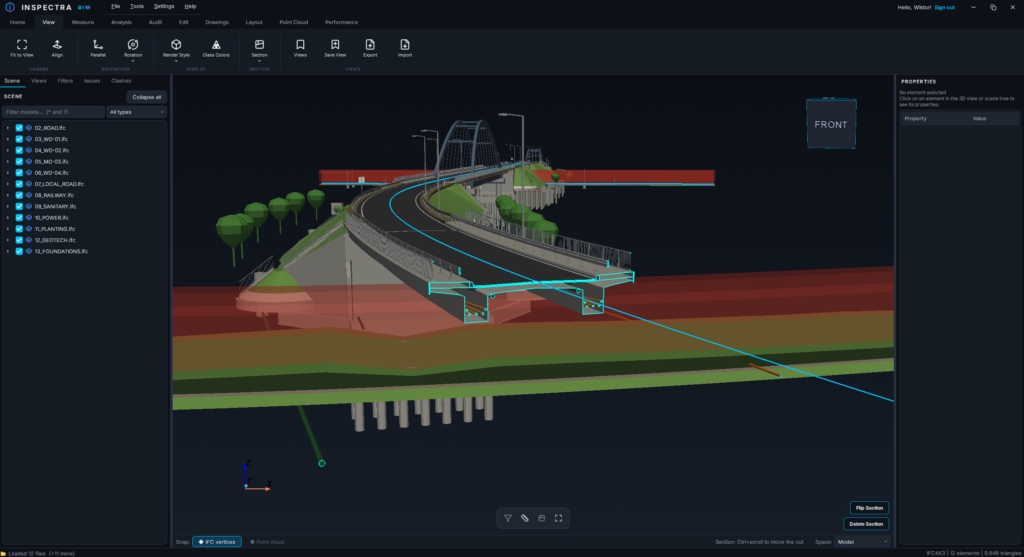
Obszar roboczy — przytnij scenę do tego, nad czym pracujesz
Sceny infrastrukturalne to w większości kontekst. Wczytujesz kilometry terenu, pełny skan korytarza i oś trasy, wszystko po to, żeby pracować nad jednym przyczółkiem. Ręczne ukrywanie otoczenia jest żmudne i cofa się samo w chwili, gdy wczytasz kolejny plik.
Obszar roboczy (zakładka Start) to zapisany prostopadłościan przycięcia. Narysuj go raz uchwytami prostopadłościanu przekroju, zatwierdź, nadaj nazwę — i wszystko poza nim znika, dopóki go nie wyłączysz. Przycina jednakowo modele IFC, chmury punktów, teren, siatki teksturowane i osie trasy, i przycina dalej: pliki wczytane później przychodzą już przycięte.
Kilka szczegółów, które mają znaczenie w praktyce:
- Bez pudełka, bez krawędzi cięcia — aktywny obszar roboczy jest niewidoczny. To zakres roboczy, nie przekrój, więc nie zaśmieca widoku i nie dodaje linii konturu, o które nie prosiłeś.
- Zwykłe przekroje nadal w nim działają — możesz wykonać normalny przekrój wewnątrz obszaru roboczego i znów go usunąć, a przycięcie wciąż jest pod spodem.
- Podróżuje w pliku sceny
.ins— wyślij scenę koledze, a on otworzy ten sam fragment. Obszary robocze są zapisywane per scena; możesz mieć ich kilka i przełączać się między nimi.
Sam prostopadłościan przekroju zyskał przy okazji coś nowego: uchwyt obrotu na górnej ścianie, dzięki któremu można go obrócić w planie i dopasować do obiektu w skosie, zamiast trzymać się osi globalnych. Wszystkie uchwyty prostopadłościanu są teraz nieco większe, więc łatwiej je złapać.
Duże modele IFC otwierają się w sekundy
Użytkownik przysłał nam model drogowy IFC 4.3 o wielkości 153 MB, który otwierał się ponad dziesięć minut. Na tyle długo, że anulował po dwóch sekundach, zakładając, że aplikacja się zawiesiła.
Okazało się, że większość tego czasu szła na nic. Bryły zapisane jako siatki teselowane to już gotowa geometria — lista punktów i trójkątów — a mimo to były przepychane przez pełne jądro geometrii, które kopiowało je mniej więcej pięćdziesiąt razy wolniej, niż trwałoby zwykłe ich odczytanie. Sam teren drogi w tym pliku kosztował 95 sekund. Do tego jądro było proszone o budowanie krzywych osi trasy, które przeglądarka następnie odrzucała.
Ten sam plik otwiera się teraz w około 15 sekund, z identyczną geometrią, kolorami i przezroczystością — sprawdziliśmy to, wczytując dziewięć modeli na oba sposoby i porównując każdy element.
Razem z tym poszły dwa powiązane problemy z wczytywaniem:
- Osie trasy IFC 4.3, których wierzchołki linii środkowej przychodziły w złej kolejności, nie rysują się już jako wachlarz linii przecinających model. Plik podaje długość osi, a linia środkowa, która się z nią nie zgadza, jest odbudowywana z własnej geometrii osi.
- Bryły łączące kształty boolowskie ze zwykłymi po cichu przychodziły bez wyciętych części — raportowane jako sukces, bez śladu w logu. Te elementy są teraz sprawdzane względem jądra referencyjnego i docinane ponownie, gdy czegoś brakuje.
Przyciąganie, które trafia tam, gdzie wskazujesz
Postawienie wierzchołka pomiaru na geometrii IFC było, słowami jednego z użytkowników, bardzo trudne. Po zmierzeniu okazało się gorsze, niż brzmiało: na typowym modelu budynku mniej więcej połowa kliknięć w widoczną geometrię była odrzucana, a na modelu drogowym dwie trzecie.
Przyczyna była niemal zabawna. Kulka przyciągania podąża za kursorem, a sprawdzenie, które pyta „czy coś tu w ogóle jest narysowane?”, odczytywało okno o wielkości dwóch pikseli — całkowicie zakryte przez samą kulkę. Najechanie stawiało kulkę; kulka blokowała kliknięcie, które miało nastąpić po nim.
Chmury punktów i geometria IFC mają teraz porządnie rozdzieloną obsługę głębi, bo używają jej do różnych rzeczy: dla skanu bufor głębi jest danymi, a dla IFC tylko świadkiem w kontroli poprawności — i piksel schowany za kulką kursora nie jest dowodem na pustą przestrzeń. Do tego mechanizm wskazywania dostał indeks przestrzenny, co skróciło pojedyncze najechanie na gęsty fragment terenu z 76 ms do 0,17 ms.
Efekt: przyciąganie trafia w geometrię modelu za każdym razem na obu modelach testowych, najgorsze opóźnienie spadło ze 198 ms do 14 ms, a mikrodrgania, które część użytkowników zauważała w chwili stawiania wierzchołka, zniknęły — nakładki pomiarowe nie przesuwają już zakresu głębi kamery podczas ruchu.
Sceny, które docierają w całości
Jeśli wysłałeś koledze scenę .ins, a jego chmura punktów nigdy się nie pojawiła, to był powód: ścieżki do chmur i siatek były zapisywane jako pełne ścieżki wskazujące na Twój własny dysk.
Teraz są zapisywane względem pliku sceny, więc folder projektu, który podróżuje, pozostaje nienaruszony. Sceny już wysłane też dostają pomoc — gdy zapisanej ścieżki nie ma, Inspectra szuka tego samego układu folderów obok pliku .ins i tam podnosi plik.
Chmury punktów i rysunki
- Bezbarwne skany LAS i LAZ otwierają się w kolorowaniu według wysokości zamiast jednym płaskim kolorem. Skan bez RGB nie ma nic do pokazania w trybie RGB, a jednolita sylwetka zasłania właśnie ten kształt, dla którego otworzyłeś plik. Jeśli inna chmura w scenie ma kolor albo sam wybrałeś tryb, nic się nie zmienia.
- Kolor LAS jest odczytywany z zakresu, którego plik faktycznie używa. Wielu producentów zapisuje wartości 8-bitowe w 16-bitowych polach, które definiuje specyfikacja, i takie chmury wczytywały się całkowicie czarne. Ta sama klasa problemu została naprawiona dla XYZ, PTX i E57 — w tym dla plików E57 z szerokimi kanałami koloru, które wcześniej w ogóle nie chciały się wczytać.
- Przekroje podłużne mają teraz znacznik w scenie 3D, jak każdy inny rysunek — i podąża on za osią trasy, zamiast ciąć prostą linią między dwoma końcami. Kliknij go, żeby otworzyć właściwości i poprawić zakres kilometrażu, głębokość widoku lub stronę patrzenia.
- Przekroje wzdłuż osi trasy można wstawiać na wpisanym kilometrażu. Kliknięcie osi wypełnia pikietę, a Ty możesz ją poprawić na dokładnie tę wartość, której potrzebujesz — oś podpory, kilometraż z zestawienia na rysunku — zamiast polować na właściwy piksel.
- Rysunki można wypełnić tym, co leży za płaszczyzną cięcia (Ustawienia rysunku, domyślnie wyłączone). Przydatne, gdy przekrój przechodzi przez roślinność lub rozproszoną geometrię i rysunek byłby inaczej pełen dziur.
Mniejsze rzeczy
- Wyczyść scenę najpierw pyta. Było to jedyne destrukcyjne polecenie bez potwierdzenia, siedzące na kafelku paska narzędzi i pod Ctrl+W — skrótem, który w większości innych programów zamyka kartę, a nie dzień pracy. Teraz proponuje zapis sceny przy wyjściu i milczy, gdy nie ma czego stracić.
- Ścianki nie znikają już podczas obracania widoku. Skrót wydajnościowy, który ukrywał powierzchnie zwrócone tyłem w czasie ruchu kamery, zakładał, że każda wyeksportowana bryła ma poprawne normalne. Prawdziwe eksporty ich nie mają.
- Statystyki wydajności można skopiować do schowka, więc zgłoszenie do wsparcia nie wymaga już zrzutu ekranu.
- Pierwsze uruchomienie testu kolizji nie zamraża już na chwilę okna na czas kompilacji jądra obliczeniowego.
Do pobrania
Inspectra BIM 1.1.0 działa na Windows 10 i 11. Jeśli masz wersję 0.11.0 lub nowszą, aplikacja sama zaproponuje aktualizację i zainstaluje ją jednym kliknięciem; w przeciwnym razie pobierz ją ze strony — instalator aktualizuje istniejącą instalację i zachowuje ustawienia oraz licencję.
Pobierz Inspectra Free · Zobacz cennik i poproś o demo
Niemal wszystko powyżej zaczęło się od wiadomości od kogoś, kto używa Inspectry na prawdziwym projekcie — plik, który nie chciał się otworzyć, narzędzie, które stawiało opór, scena, która dotarła niekompletna. Przysyłajcie je dalej.
Wypróbuj na własnym modelu
Inspectra BIM Free otwiera IFC, E57/LAS i XML lokalnie — bez wtyczek, bez chmury.